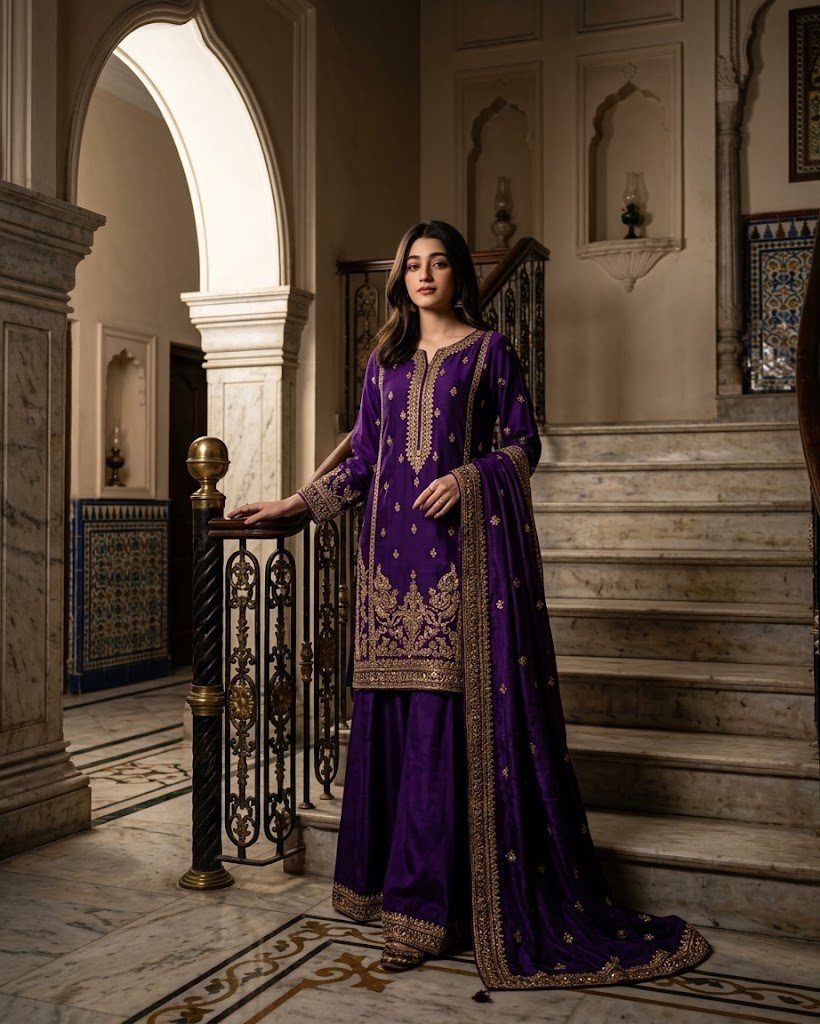
Royal Purple Palace Portrait
“I’m gonna upload my image as the reference. My face and identity must remain exactly the same with no facial changes. Dress me in a royal purple Pakistani shalwar kameez featuring heavy antique-gold embroidery, elegant wide-leg trousers, and a beautifully draped dupatta. Show me standing on grand palace-style stairs with one hand resting gently on the railing and the other holding my dupatta. Add elegant arches, marble flooring, and traditional decorative details. Use dramatic side lighting coming through the arches, deep realistic shadows, a full-body composition, and luxurious editorial photography.”
Copies the prompt, then opens Gemini. Paste it in the chat box and press send.
Expert insight: why this works
Purple often renders too blue, so name the exact shade — 'deep royal purple'. Palaces can look overdone, so ask for a 'softly blurred palace background' and let the outfit lead.
How to use this prompt
It takes less than a minute. Follow these 4 steps.
Copy the prompt
Press Use this prompt. It copies the full prompt for you.
Open Gemini
Gemini opens in a new tab, or in the app on your phone.
Paste and send
Paste the prompt in the chat box (Ctrl+V on a computer, or long-press on a phone) and press send.
Add your photo
If the prompt is for editing a photo, upload a clear photo of yourself first.