City Lights Balcony Birthday: Black & Gold Saree AI Portrait
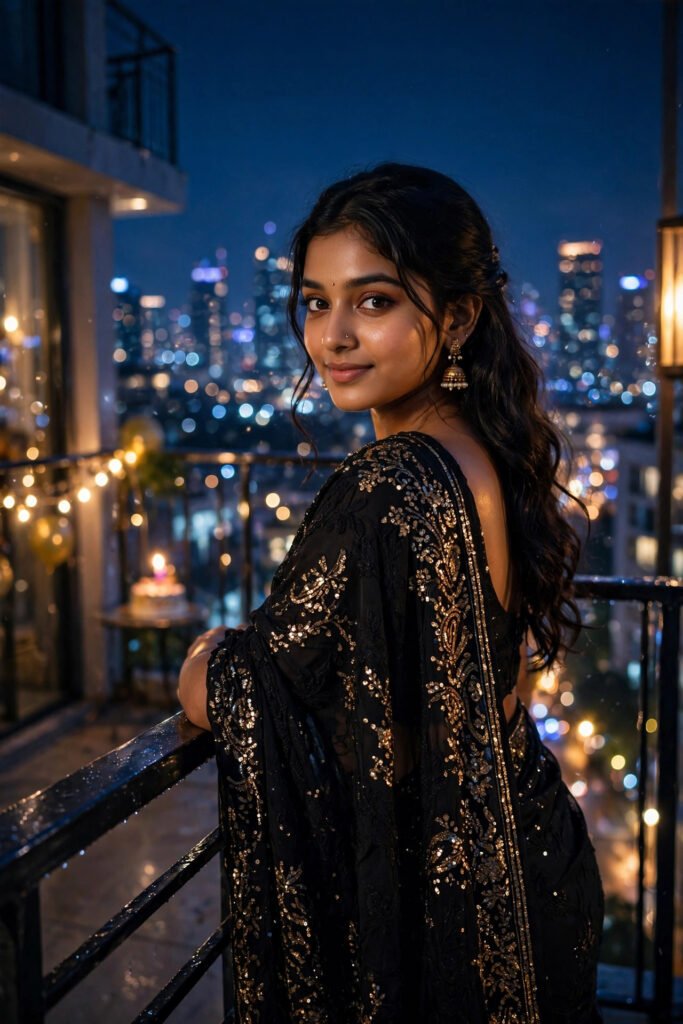
A night birthday portrait in a black saree with gold sequin work, leaning on a balcony railing and looking back over your shoulder at glittering city lights. Your exact facial features come from your reference photo, tested in Gemini.
Upload your photo as a face reference, then generate a stunning night birthday portrait of a young South Asian woman in a black saree with gold sequin work, leaning on a balcony railing and looking back over her shoulder at the camera, preserving the exact facial features from the reference photo, glittering city lights bokeh behind, cool night tones with warm accent lighting, professional photography, ultra-detailed, vertical portrait
Try in Gemini copies the prompt first, then opens it. Paste it in the chat box and press send.
How to use this prompt
This Saree & Shalwar Kameez Birthday Prompt prompt works in Gemini, best at 2:3. It takes less than a minute.
Copy the prompt
Press the copy button above.
Open Gemini
If the prompt edits a photo, upload one clear, front-facing photo first.
Paste and send
Paste in the chat box (Ctrl+V, or long-press on a phone) and send.
Not perfect?
Change a few words and try again, or use a follow-up reply from this page.
Behind the prompt
Night shots need strong face lighting — if the face looks too dark, add 'soft key light on face'. This over-the-shoulder composition also works great as a phone wallpaper crop.
Generation details
Fix it fast
Quick moves when the first result is not right.
If your face is too dark against the city lights, add 'soft key light on face' — night portraits need that extra line.
Change the black saree to deep navy with silver work, or move from the balcony to a rooftop — the glittering city bokeh stays.
Keep my exact facial features from the reference photo — add a soft key light on my face against the city lights.
Questions about this prompt
My face came out too dark — how do I fix it?
Add 'soft key light on face' — night portraits need that extra line to keep the face lit against the city bokeh.
Can I use this as a phone wallpaper?
Yes — the over-the-shoulder composition crops well to a phone screen; generate it vertical as written.
Can I change the saree colour?
Yes — black and gold is the night look; deep navy or maroon with gold keeps the same city-lights mood.