Premium Collector Figure of You — Suit Edition
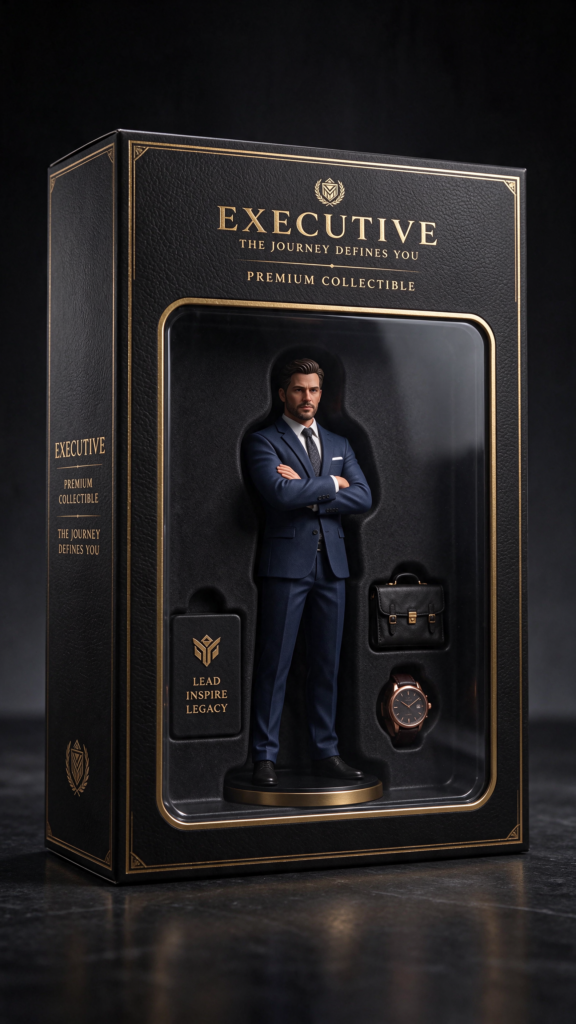
You in a navy suit as a premium collector-edition figure in a black and gold box, briefcase and watch at your side. Face kept from your photo, tested in Gemini.
Build this figure from my uploaded photo and keep my face exactly as it is — same eyes, jaw, smile, skin tone and hair, fully recognisable, with nothing about my face redrawn or softened. Show me as a premium collector-edition 3D figure inside a tall retail toy box, photographed straight-on like a high-end product shot. The box is black with gold trim, a clear front window, and an elegant title strip across the top. My figure wears [[a navy business suit with a white shirt and dark tie|Outfit]], standing tall with one hand adjusting a cuff, calm confident expression. In moulded compartments beside me: Accessory and Accessory. Studio product lighting, a soft key light from the front-left so my face stays bright against the dark box, gentle shadow beneath. Plain dark-grey background, vertical frame, full box in shot. Do not change my face or skin tone. No extra figures, no foggy plastic, no glare across the face, no watermark. Priority order: 1. My face unchanged. 2. The premium black and gold box. 3. The suit. 4. Accessories.
Try in Gemini copies the prompt first, then opens it. Paste it in the chat box and press send.
How to use this prompt
This 3D Figure & Toy Box Photo Prompts prompt works in Gemini, best at 9:16. It takes less than a minute.
Copy the prompt
Press the copy button above.
Open Gemini
If the prompt edits a photo, upload one clear, front-facing photo first.
Paste and send
Paste in the chat box (Ctrl+V, or long-press on a phone) and send.
Not perfect?
Change a few words and try again, or use a follow-up reply from this page.
Behind the prompt
Dark boxes eat light — if your figure's face falls into shadow behind the window, ask in the same chat for the face lit like a product hero shot, box design unchanged.
Generation details
Fix it fast
Quick moves when the first result is not right.
Check the face against the dark box first: if it fell into shadow, correct only the face lighting in the same chat — bright and clear, box untouched.
Go full tuxedo: black suit, bow tie, and a tiny red carpet strip under the box for a premiere-night edition.
My face exactly as in my photo, lit bright and clear — keep the black and gold box exactly as it is.
Questions about this prompt
What photo should I upload?
A clear, front-facing photo in decent light. Formal clothes in the reference help but are not required — the prompt dresses the figure.
Does this work for a woman in a suit?
Yes — keep the prompt and change the outfit line to her suit; the box and face-lock work the same.
Why does my face look dark?
Black packaging absorbs light in renders. The prompt asks for a lit face; if a run still darkens it, correct the face lighting only.