Boutique Catalog Shot
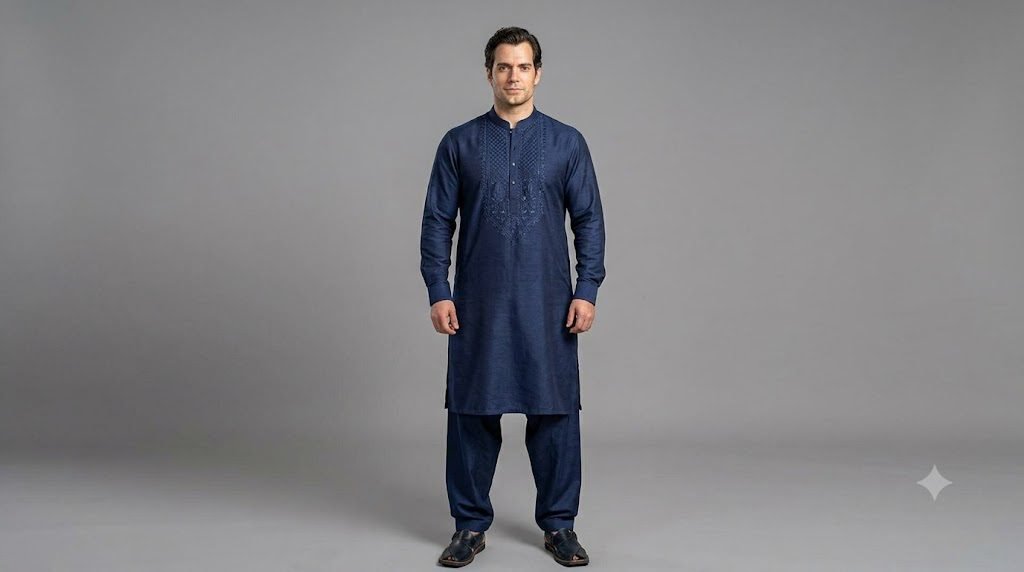
A boutique catalog shot in a navy blue raw silk shalwar kameez on a plain grey background, your face preserved exactly from your photo, tested in Gemini.
"Preserve the exact face and identity of the person in the uploaded photo. Replace clothing with a navy blue raw silk shalwar kameez featuring embroidered chest panel detail. Plain grey studio background, full-body straight-on shot, even lighting, no changes to facial features."
Try in Gemini copies the prompt first, then opens it. Paste it in the chat box and press send.
How to use this prompt
This Man in Shalwar Kameez prompt works in Gemini, best at 2:3. It takes less than a minute.
Copy the prompt
Press the copy button above.
Open Gemini
If the prompt edits a photo, upload one clear, front-facing photo first.
Paste and send
Paste in the chat box (Ctrl+V, or long-press on a phone) and send.
Not perfect?
Change a few words and try again, or use a follow-up reply from this page.
Behind the prompt
Catalog shots need clean light and the full outfit visible. If the pose gets too artsy, add 'standing straight, full body visible, plain background'.
Generation details
Fix it fast
Quick moves when the first result is not right.
If the model pose drifts from catalog style, add 'standing straight, full body visible, plain background, even lighting'.
Shoot the same outfit against a warm beige studio backdrop for a softer premium catalog.
Preserve my exact face and identity, standing straight and full-body against the plain grey background.
Questions about this prompt
What photo should I upload?
A clear full or half-body photo. The prompt preserves your exact face and identity and replaces only the clothing.
The pose gets too artsy for a catalog - what fixes it?
Add 'standing straight, full body visible, plain background' to lock the catalog framing.
Can I change the fabric?
Yes. Cotton or blended silk work; keep the embroidered chest panel for the boutique look.