Violet Frequency — Neon Night Editorial
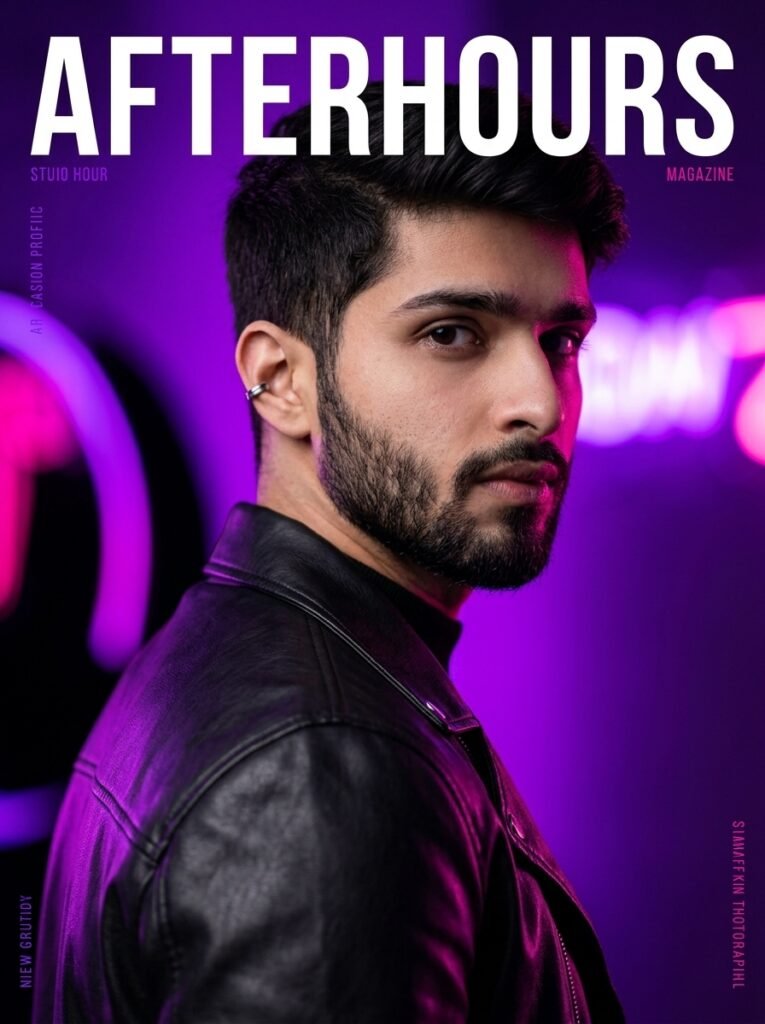
Create a photorealistic, cinematic men's fashion editorial portrait using my uploaded reference photo as the primary facial identity reference. Preserve the exact same person's face, facial features, skin tone, and natural proportions. **Strict identity and hairstyle preservation:** Match the original hairstyle in the reference photo exactly. Preserve the hairline, haircut, length, texture, direction, parting, volume, and color. Do not replace it with a new style. Preserve the original beard and mustache characteristics. **Subject and styling:** The man wears a fitted black leather jacket over a black mock-neck shirt, with a small silver ear cuff only if anatomically appropriate. The leather has realistic grain, controlled reflections, and a premium tailored fit. **Pose and composition:** A close-up portrait with the subject looking over one shoulder toward the camera. His body faces away slightly, creating a diagonal shoulder line. The expression is mysterious and composed, with the face remaining clearly visible. **Background and colors:** A vivid violet and hot-magenta studio environment with saturated neon gradients and deep black shadows. Use violet highlights on one side and magenta edge lighting on the other, while maintaining natural skin color. **Lighting and photography:** Dual-color lighting with carefully controlled exposure on the face. Simulate a 85mm lens at f/2, producing a shallow depth of field and softly blurred neon background while keeping the eyes, skin, and jacket sharp. **Magazine design:** Experimental fashion magazine cover inspired by contemporary nightlife editorials. Add a clean uppercase masthead reading “AFTERHOURS” in bright white, with small violet and magenta typography arranged along the edges. **Final quality:** Cinematic neon color grading, realistic skin and leather, rich shadows, sharp facial detail, vertical 3:4 magazine cover. No watermarks.
Try in Gemini copies the prompt first, then opens it. Paste it in the chat box and press send.
How to use this prompt
This Studio prompt works in Gemini. It takes less than a minute.
Copy the prompt
Press the copy button above.
Open Gemini
If the prompt edits a photo, upload one clear, front-facing photo first.
Paste and send
Paste in the chat box (Ctrl+V, or long-press on a phone) and send.
Not perfect?
Change a few words and try again, or use a follow-up reply from this page.
Behind the prompt
Colored rim lights create atmosphere, but too much magenta or violet on the face can make skin look unnatural. Keep a neutral key light on the face and use neon colors mainly for the edges and background.